Get a short, factual text for a listing, written from what you measured: the area by the standard, the rooms, the floors and the outdoor space. Edit it, then copy it.
This needs Pro.
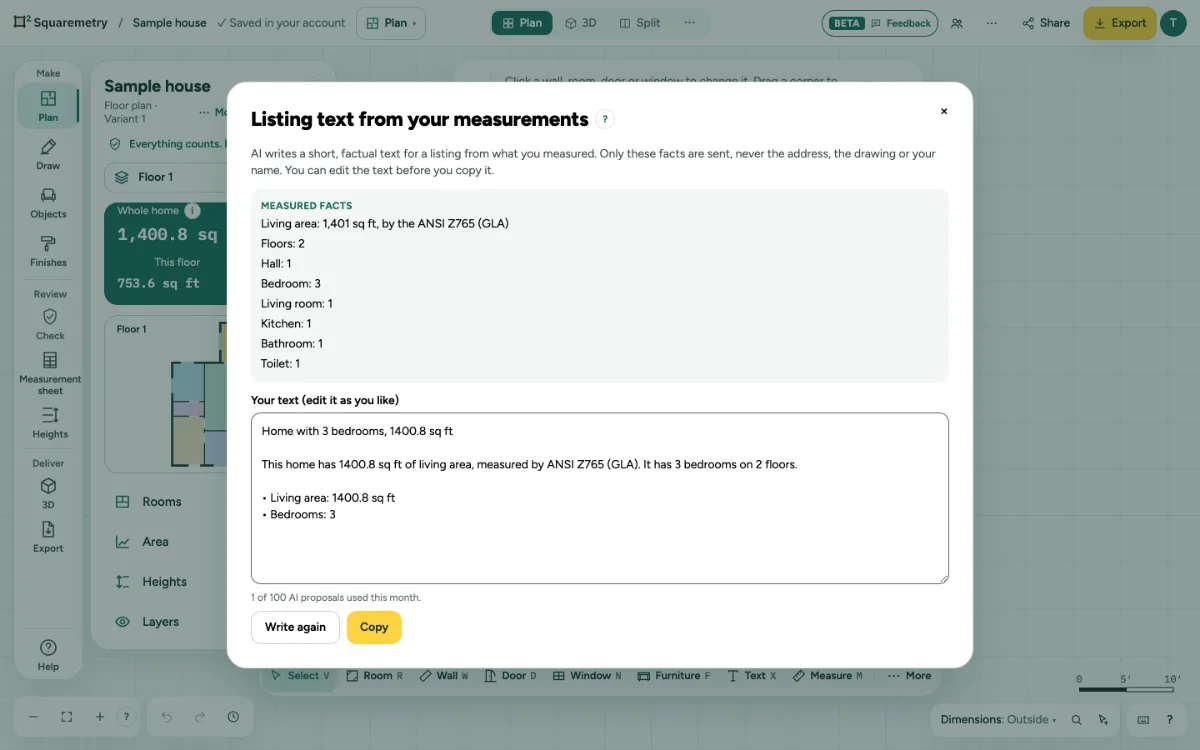
Listing text from your measurements (AI): step by step
1. Open it
Click … at the top right, open File and choose Listing text from your measurements (AI)…, or search it with ⌘K. Measured facts shows what is sent.
2. Write it
Click Write a listing text. Only the measured facts are sent, never the address, the drawing or your name.
3. Check and edit
Your text is ready to edit. We leave out any part with a number that is not in your measurements, or a word that exaggerates, and say how many.
4. Copy it
Click Copy and paste it into your listing. Write again gives a new text. If you edited the text, it first asks before replacing your changes; Cancel there keeps your text and sends no AI request. If you cancel while it writes, or the text cannot be written, your text stays. Closing the window removes the text; if you changed it and did not copy it yet, the window asks first. If your session expires, your text stays: copy it before you sign in. Nothing in your plan changes.
Messages you may see
- We left out 2 parts: they had a number that is not in your measurements, or a word that exaggerates.
- Draw the home first: there is no area to write about yet.
- You have used all 100 AI proposals of your subscription this month. Nothing was changed. You can draw the plan yourself, or try again next month.
- You are a reviewer in this office: you look, you do not change anything. AI proposals are made by a drafter, an admin or the owner. Ask the norm and the AI help are open to you.
- Your session has expired. Your text is still here: copy it before you sign in.