Tell us what works and what does not, right from the editor. Install Squaremetry as an app to open it like any other program.
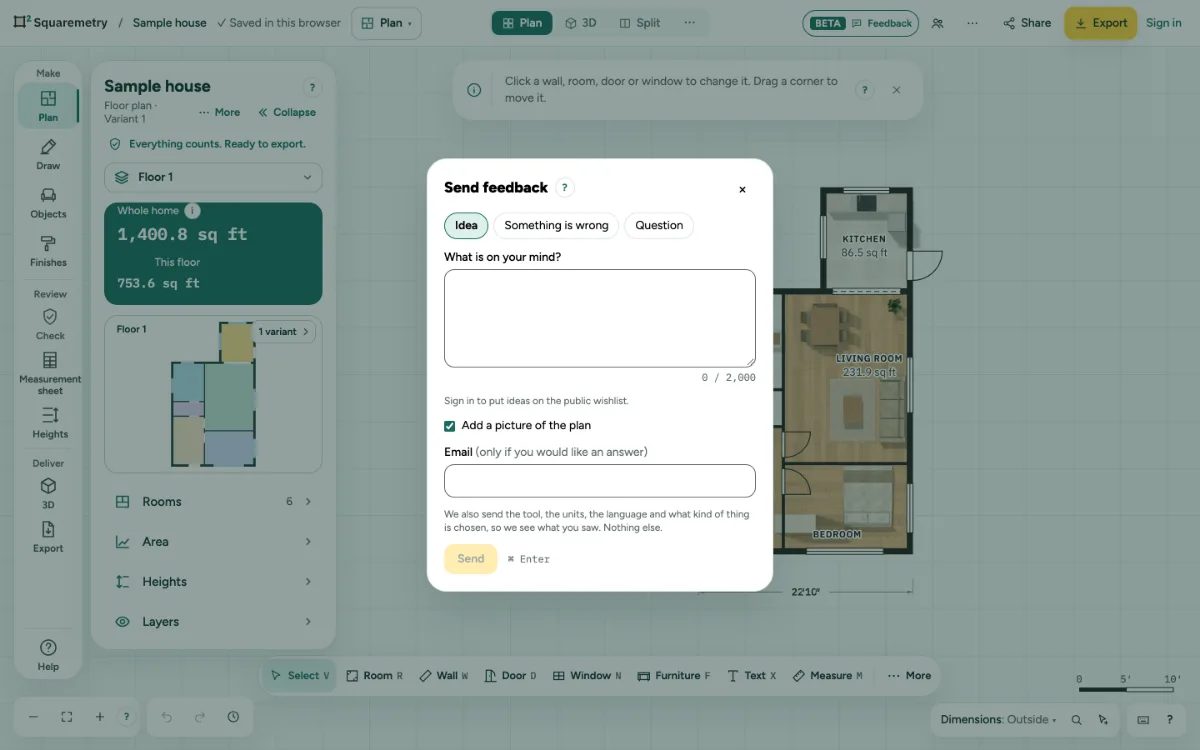
Send feedback and install the app: step by step
1. Send feedback
Open Help, the ? at the bottom right, and choose Send feedback. Pick Idea, Something is wrong or Question, type your message and add a picture of the plan if you like. Your email is only needed if you would like an answer.
2. Offline
Without a connection your message waits in this browser and goes out when you are back online.
3. Install the app
Open Help, the ? at the bottom right, and choose Install app. You see the steps for your browser; where the browser offers it, there is also an Install button. On an iPhone or iPad, tap Share, then Add to Home Screen. More in Install Squaremetry as an app.
4. About
Help, About Squaremetry shows the version. Your plans and exports belong to you.
Parts on the screen

Help corner. Dimensions, search, keyboard shortcuts and the Help menu with the guides.
Messages you may see
- You sent a lot in a short time. Please try again in 10 minutes.
- A new version is ready
- This part needs a connection the first time. Your plan is safe on this device.