The public wishlist shows what is planned, in progress and done. Vote for what matters to you, or suggest something new. No names are shown.
You need a free account for this.
Wishlist: vote on what comes next: step by step
1. Open the wishlist
Open Help, the ? at the bottom right, and choose Wishlist: vote on what comes next. It opens on the site in a new tab. Anyone can read it, without an account.
2. Find a wish
Choose All, Planned, In progress, Done or Ideas, search by a word, and sort by Most votes or Newest. A wish that is done can link to its line in the changelog.
3. Vote
Signed in, press Vote on a wish. You have one vote per wish; press Voted to take it back. Signed out, Sign in to vote opens the sign-in window in the editor.
4. Suggest a wish
Signed in, give a title and say what it should do and why, then press Send for review. Your wish waits for the team and shows under Your suggestions until it is added. You can send five a day.
5. From feedback
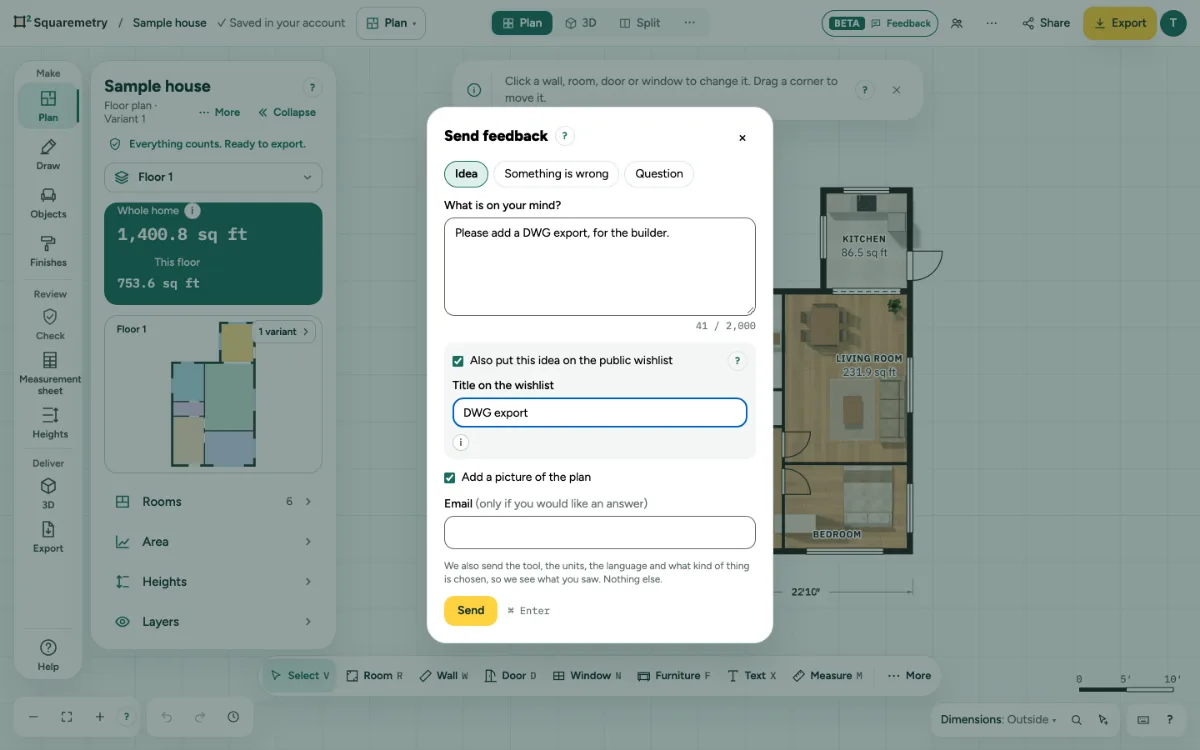
In Send feedback, choose Idea and tick Also put this idea on the public wishlist, then give it a title. Your message arrives as feedback and the idea waits for review for the wishlist.
Parts on the screen

Help corner. Dimensions, search, keyboard shortcuts and the Help menu with the guides.
Messages you may see
- Sign in to put ideas on the public wishlist.
- Thanks. Your message has arrived, and your idea waits for review for the wishlist.
- Your message has arrived, but the idea could not go on the wishlist. You can add it on the wishlist page.