Sign in with a code from your email and keep your homes in your account. Drawing keeps working with or without an account.
You need a free account for this.
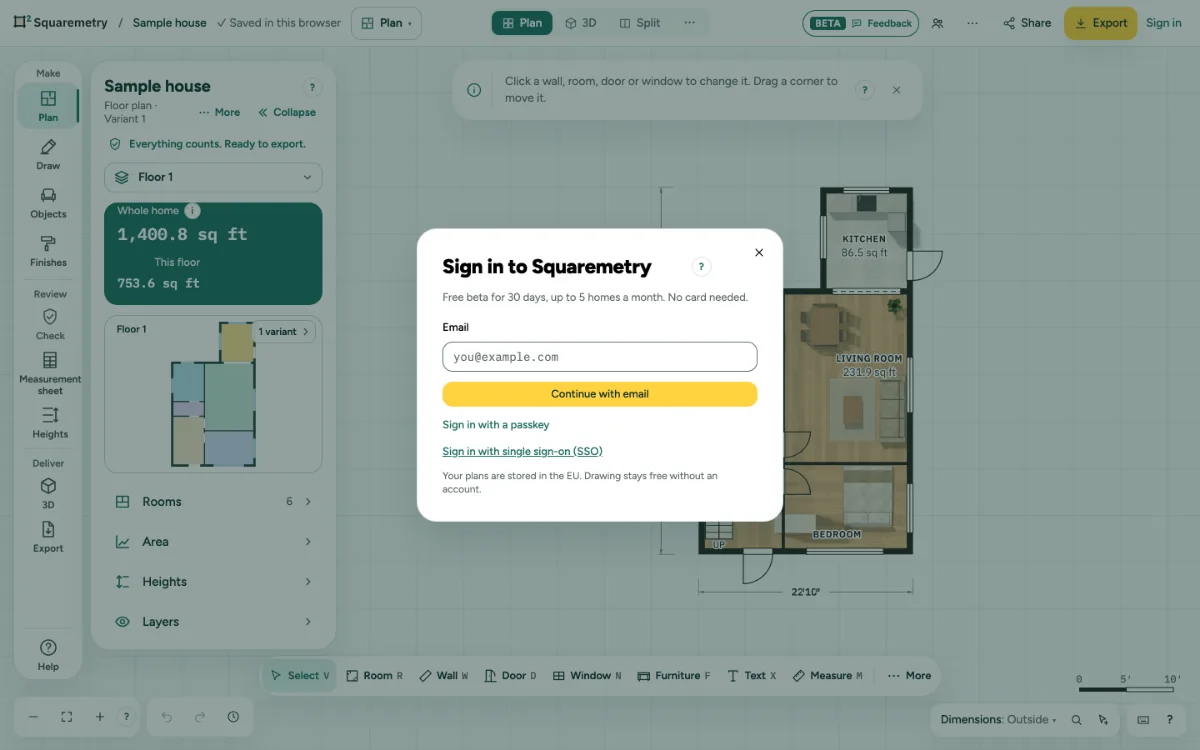
Sign in and save homes to your account: step by step
1. Sign in
Click Sign in, type your Email and click Continue with email. Type the 6-digit Code and click Sign in. The code works for 10 minutes. Or choose Email me a link instead; the link works for 5 minutes.
2. Answer two short questions
After your first sign-in you are asked what you use Squaremetry for and how you found us. Skip for now is fine.
3. Add your plan
If you already drew something, you are asked to add it. Click Add to my account. The status then shows ✓ Saved in your account. Not now keeps it in this browser only.
4. Work offline
Without a connection, or when our server is briefly away (for example during an update), the status shows Offline · kept on this device. You stay signed in. As soon as it can, it saves to your account by itself, without reloading.
5. Changes made elsewhere
When your client comments or approves through a review link, or someone saves through an edit link or on another device, an open editor picks it up when you come back to it. Comments and approval are added to the plan you are working on: you stay on the same floor and Undo keeps working. If the drawing itself is newer and you were working, a message asks first, once you finish what you are drawing: Open it opens the newer version on the same floor. If you keep working instead, your next save keeps the other version in Versions, and the message has a Versions button.
6. When your account stops saving
Signed out somewhere else, or your session ended: the status shows Signed out · kept in this browser, with Sign in above the plan. After you sign in, your latest changes go to your account right away. Home moved to the trash: In the trash · kept in this browser, with Put back. Removed from the team: View only · kept in this browser, with Download the file. Your work always stays in this browser.
7. A very large plan
Your account holds plans with up to 2,000 walls on a floor and 25,000 parts in total: walls, doors, windows, furniture, lines and notes together. A larger plan, or one that takes too long to measure, stays in this browser and the status shows Too large for your account · kept here. Your account keeps the version from before. Make the plan smaller, or move some floors to a second home, and it saves again by itself.
8. Switch workspace
In a team, the Account menu lists My workspace and your teams. Homes belong to the workspace you work in. If you were removed from the team you were working in, the menu shows My workspace so you can switch back. The menu also has My homes, Settings and Sign out. Sign out keeps your plan in your account and this browser starts with a new plan, so the next person never sees your home; changes that could not reach your account yet are kept apart and come back when you sign in here again. If this browser cannot keep them apart either (its storage is full or blocked), you stay signed in and nothing is removed: Try again, Download the file, Stay signed in, or Sign out anyway after a second question. If someone else signs in here while such changes of the previous account are still waiting, they see nothing of that plan: they can only Try again or Sign out, and the changes stay here until their owner signs in again. After they sign out, the plan stays hidden in this browser: the question then offers Try again or Sign in, so its owner can sign in and continue.
Parts on the screen

Save status. Says where your plan is kept: in this browser or in your account.
Messages you may see
- That code is not right. Check the email and try again.
- This code has expired. Send a new one.
- Too many tries. Wait a few minutes, then try again.
- This link has expired or was already used. Sign in again from the editor.
- Signed out. Your plan stays in this browser.
- This plan is too large for your account. It stays in this browser.
- Signed out. Your plan is in your account; this browser now starts with a new plan.