Make a key for the public API to calculate areas or read your plans from your own software. Live keys come with Pro, Team or Enterprise; a sandbox key is free for testing.
This needs Pro.
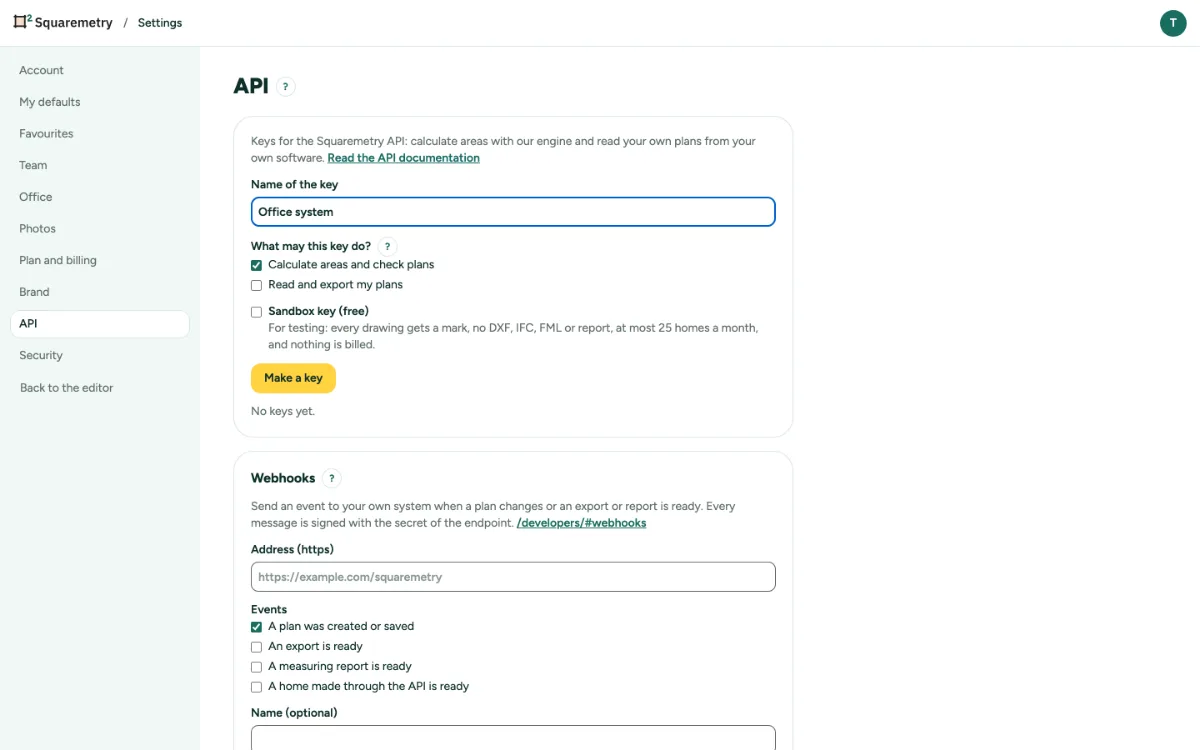
API keys: step by step
1. Open the API tab
Open Settings, tab API. Only an owner or admin of the workspace sees it.
2. Make a key
Type a Name of the key, tick what it may do (Calculate areas and check plans, Read and export my plans) and click Make a key. Without Pro or Team, only a Sandbox key (free) can be made.
3. Copy it now
Click Copy, then I have saved it. We show the key only once and keep only a fingerprint.
4. Watch and revoke
Each key shows its calls this month and when it was last used. Revoke stops it at once. Rotate makes a new key; the old one keeps working for 24 hours.
Messages you may see
- API keys come with Pro or Team. Upgrade this workspace to make a key.
- This workspace has the most keys it can have. Revoke one first.
- Key revoked. It stops working at once.