In Settings you can change your name, download everything in your account in one zip, or delete your account.
You need a free account for this.
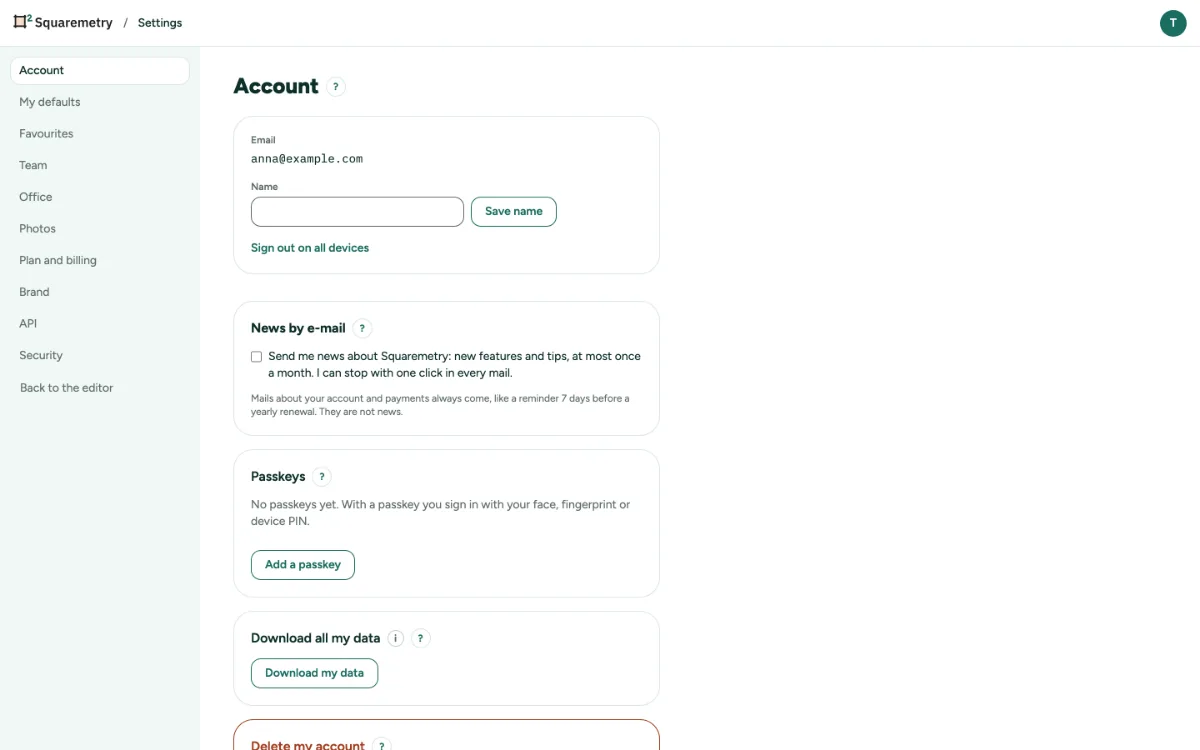
Download or delete your data: step by step
1. Your name
Open Settings, tab Account. Type your Name and click Save name. Sign out on all devices signs you out everywhere else.
2. Download your data
Click Download my data. You get one zip with every house as a .sqm file, a PDF and a CSV of the rooms, plus your account details. Houses in the Trash are in the folder Trash. personal-data.json holds everything else about you (sessions, devices, consents, waitlist, feedback, AI log, API keys, payments); each workspace has workspace-data.json, a folder Versions with named and pinned versions, and a folder Files with photos, documents, exports and logos. Keys and other secrets are left out. The zip is made in your browser.
3. Delete your account
Under Delete my account, type DELETE in capital letters and click Delete my account. You are signed out everywhere and get a confirmation email.
4. What happens next
Your own houses go to the Trash for 30 days. Then they and your account are deleted for good. Houses of a team stay with the team. A running Pro is canceled.
5. If deleting is blocked
If you signed in more than 10 minutes ago, sign in again first. If you own a team with other people in it, make someone else the owner in Team first.
Messages you may see
- For your safety, sign in again first, then delete.
- Your account is being deleted. You are signed out everywhere. We sent a confirmation by email.