A client or seller opens a review link, puts a comment on the spot where something should change, and approves the plan with their name.
You need a free account for this.
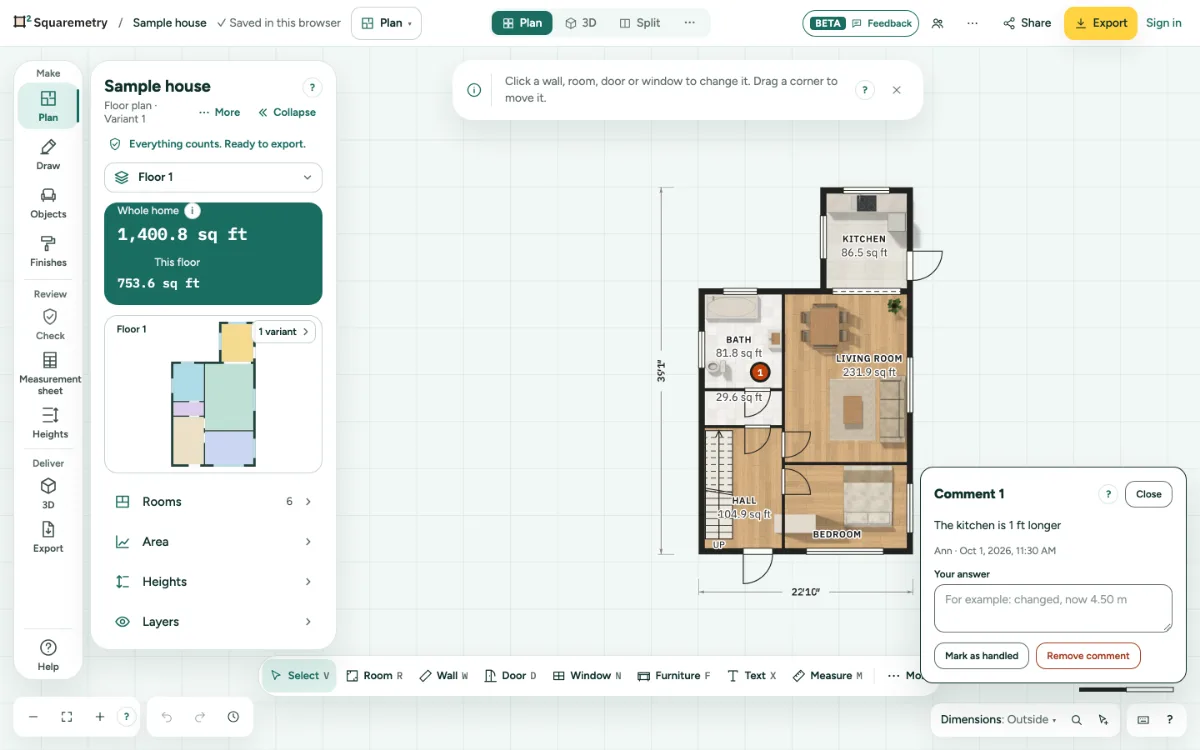
Comments on a spot and approval: step by step
1. Send a review link
Deliver an assignment by link, or open Share, choose Review and click Make review link (30 days). Share shows who approved and how many comments are open.
2. Comment on a spot
On the review page, click Add a comment, tap the spot on the plan, type the comment and click Place comment. It appears on your plan as a numbered dot.
3. Answer and handle
Click a dot on your plan, type your answer and click Mark as handled. Your answer is saved as you type; Esc first undoes what is not saved yet, a second Esc closes the card. Undo works as for every change.
4. Approve
The client or seller chooses I am the client or seller, types a name, ticks the box and clicks Approve, with a signature if they like. The date and this version of the plan are saved. If the plan changes after the approval, the page asks again and the new approval is saved; the earlier one stays in the history of the plan. On an unchanged plan there is no second approval. The drawing, the rule set, outdoor space, an outbuilding and the foundation count as a change, in Italy also the plot (the garden counts); the client, the address and the assignment do not. If two people approve at the same moment, the first approval is kept and the other person sees it right away.
Messages you may see
- Comment placed. The sender sees it on the plan.
- The plan changed after this approval.