An edit link lets someone change this plan without an account, for up to 30 days. They cannot delete the home, change the address or share it.
You need a free account for this.
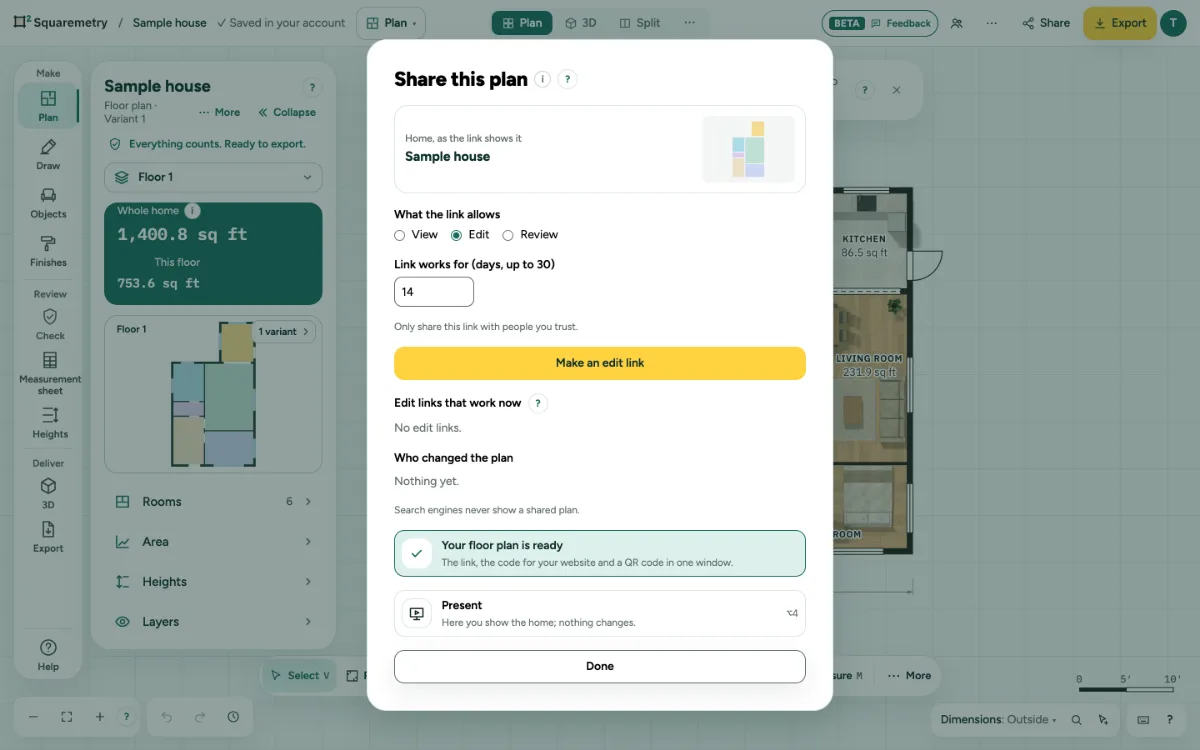
Let someone change your plan with an edit link: step by step
1. Make the link
Click Share and choose Edit. Set Link works for (days, up to 30); 14 is the default. Click Make an edit link, then Copy link.
2. What your guest sees
A bar says You are editing someone else’s plan. Their changes are saved in your plan. Without a connection or after a server error, their changes stay in their browser, also after a reload, and are saved as soon as possible. If the plan changed in the meantime (you saved, or your client left a comment or an approval), nothing is overwritten: the comments and the approval are added to their version, and the other version is kept in Versions.
3. See who changed it
Under Who changed the plan, you see each change by a visitor via link, or by someone in your account on another device.
4. Stop it
Under Edit links that work now, click Turn off.
Messages you may see
- Only share this link with people you trust.
- Pick between 1 and 30 days.
- This is someone else’s plan. Only the owner can share it.
- Not saved: server error. We try again shortly.