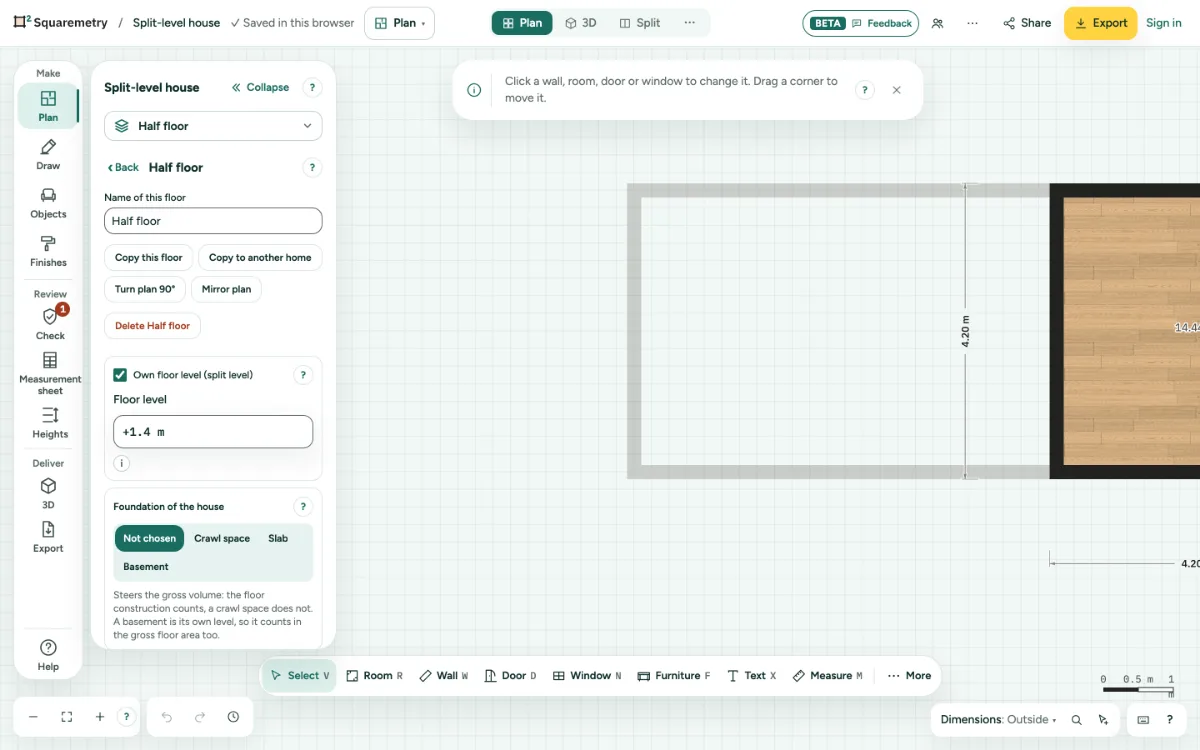
A floor with its own floor level, such as a half level at +1.40 m next to the ground floor. A stair links the two levels, and every level is its own storey in the area and the volume.
Split levels and half floors: step by step
1. Add the floor
Click the floor field in the left panel and then Add floor, and draw its walls where the half level is.
2. Give it its own level
Go to that floor, click More at the top of the left panel, then This floor, and tick Own floor level (split level). Type the Floor level, for example +1.40 m. This level no longer moves with the floors below or above.
3. Link a stair
Choose the stair and pick Goes to: the half level. The stair height becomes the difference in floor level and follows it when a level moves. The stairwell goes on the floor the stair goes up to, and moves along when you pick another level. A level at the same height cannot be chosen. Type your own Floor to floor or pick the other direction, and the stair no longer follows the level: Goes to shows The next floor up again and the stair keeps your height. The same happens when the level it went to is deleted or comes to the same height.
4. What counts
Each level is a storey of its own. The gross volume of a level runs to the first level above it in the plan, so a half level next to it does not cut the room below short.
Messages you may see
- Type a level from −20 m to +20 m.