With Pro or Team, PNG, JPG and WebP have a fourth size: 8K, 7680 px wide, for large prints and zooming in.
This needs Pro.
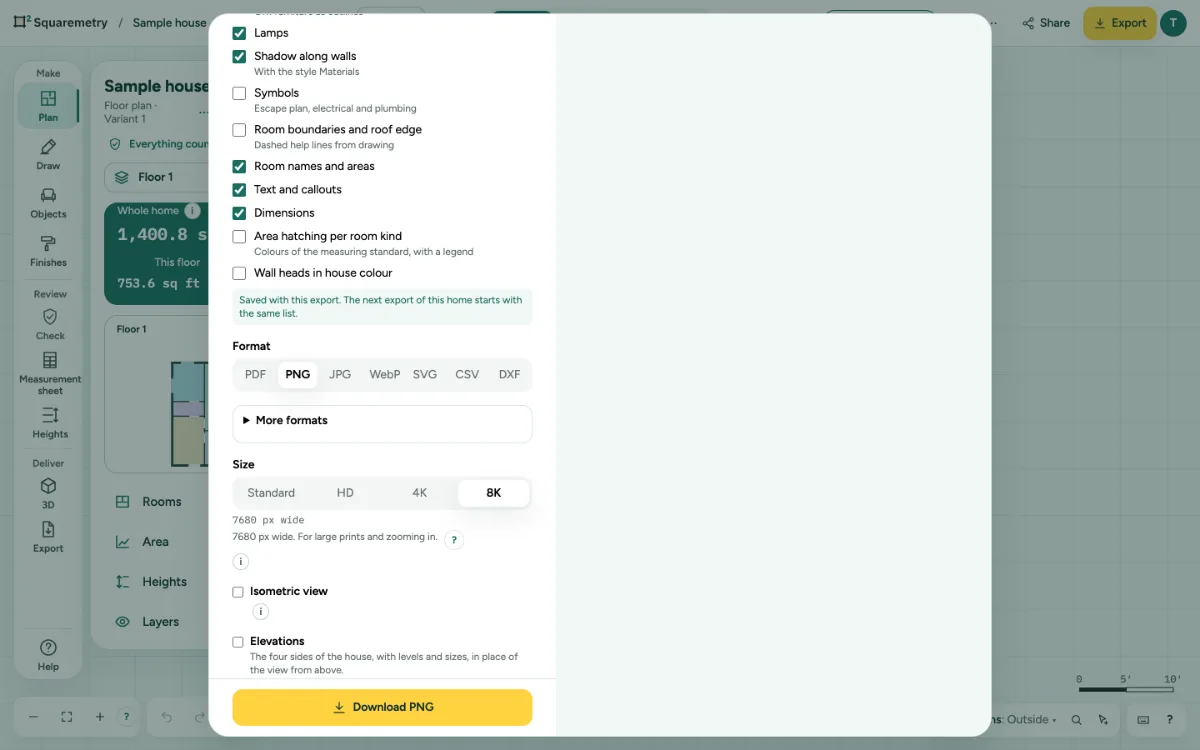
Export an image in 8K: step by step
1. Pick PNG or JPG
Click Export and choose PNG, JPG or WebP. Under Size you see Standard, HD, 4K and, with Pro or Team, 8K.
2. Pick 8K
The line under the sizes says 7680 px wide. The drawing and the texts grow with it. An image is at most 16,384 px high and 118 million pixels in total (8K for a plan twice as tall as wide); a very tall or narrow plan past that gets a sentence with its size, before anything is sent. Choose a smaller size, or SVG or PDF.
3. When the device cannot
Many phones and tablets cannot make an image this large. You then see a message instead of an empty image; choose 4K, or export on a computer.
4. Without Pro
With an unlocked home but without Pro or Team, a short line at 4K says that 8K comes with Pro or Team. Free exports have only the small size.
Messages you may see
- This device cannot make an image this large. Choose 4K, or try on a computer.
- 8K comes with Pro or Team.