Start a plan from a room scan made with an iPhone or iPad with LiDAR (RoomPlan as JSON or USDZ), from a BIM file (IFC), or trace over a point cloud.
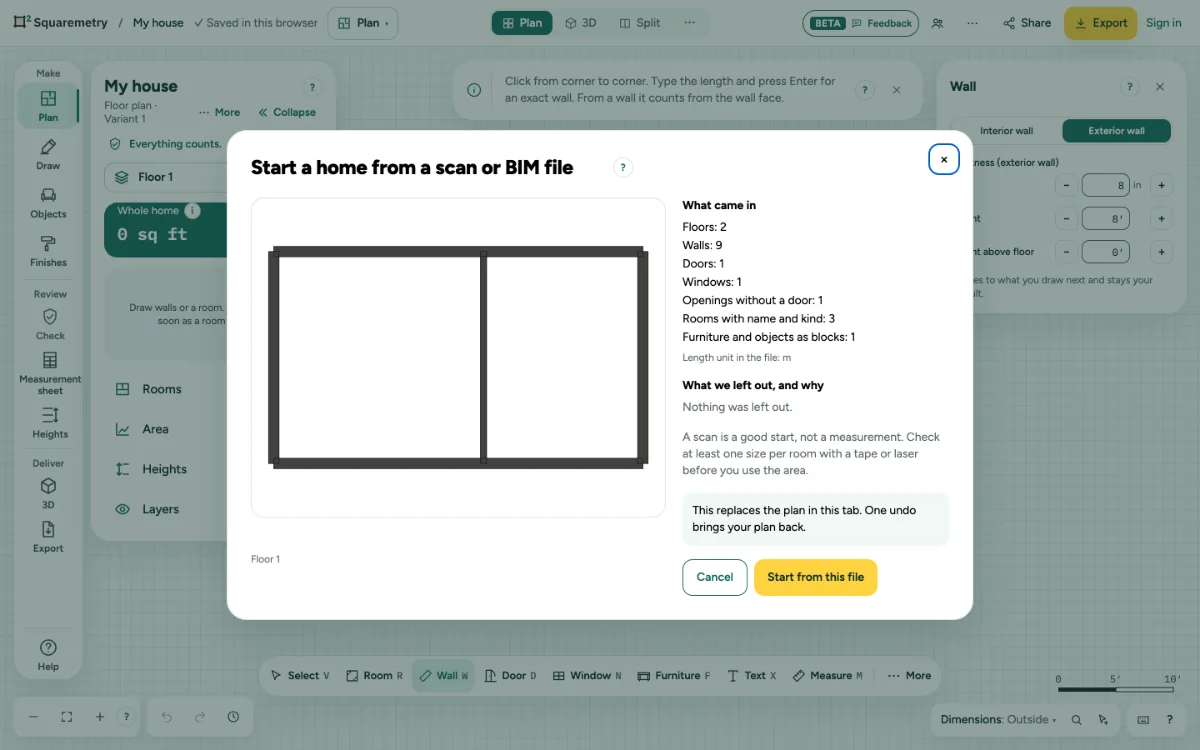
Start from a scan, an IFC file or a point cloud: step by step
1. Pick the file
Click … at the top right, open File and choose Import a scan or BIM file…, or drag an .ifc, .usdz or .ply file onto the page.
2. Check what came in
The window lists What came in (floors, walls, doors, windows, openings, rooms with name and kind) and What we left out, and why, with the length unit of the file.
3. Scans
A scan sees only the inside of a room. Two scanned walls back to back become one interior wall with the real gap. Other walls become outer walls of 20 cm, outward from the room. Room names come from the scan app.
4. IFC
Walls, doors, windows, openings and rooms come in per storey; another building becomes an outbuilding. Floors, roofs, stairs and furniture stay out for now. A file made with Squaremetry comes back with the same standard and units.
5. Start
Click Start from this file. It replaces the plan in this tab. One undo brings your plan back.
6. Point clouds
A .ply, .xyz or .pts file becomes a slice at 1.2 m above the floor, as the underlay at the right scale. Trace the walls on top of it.
Messages you may see
- This USDZ holds a binary scene, which we cannot read yet. In your scan app, export the room as JSON (RoomPlan data) and import that file.
- This file is larger than 150 MB. Please export one home or one floor at a time.
- A scan is a good start, not a measurement. Check at least one size per room with a tape or laser before you use the area.