Review, in the rail of Plan, is where you check and measure by the standard: Check, Measurement sheet and Heights. The same plan, with the standard, the main number, the checks, the measurement sheet and what counts. It never changes your drawing. This used to be the Survey editor.
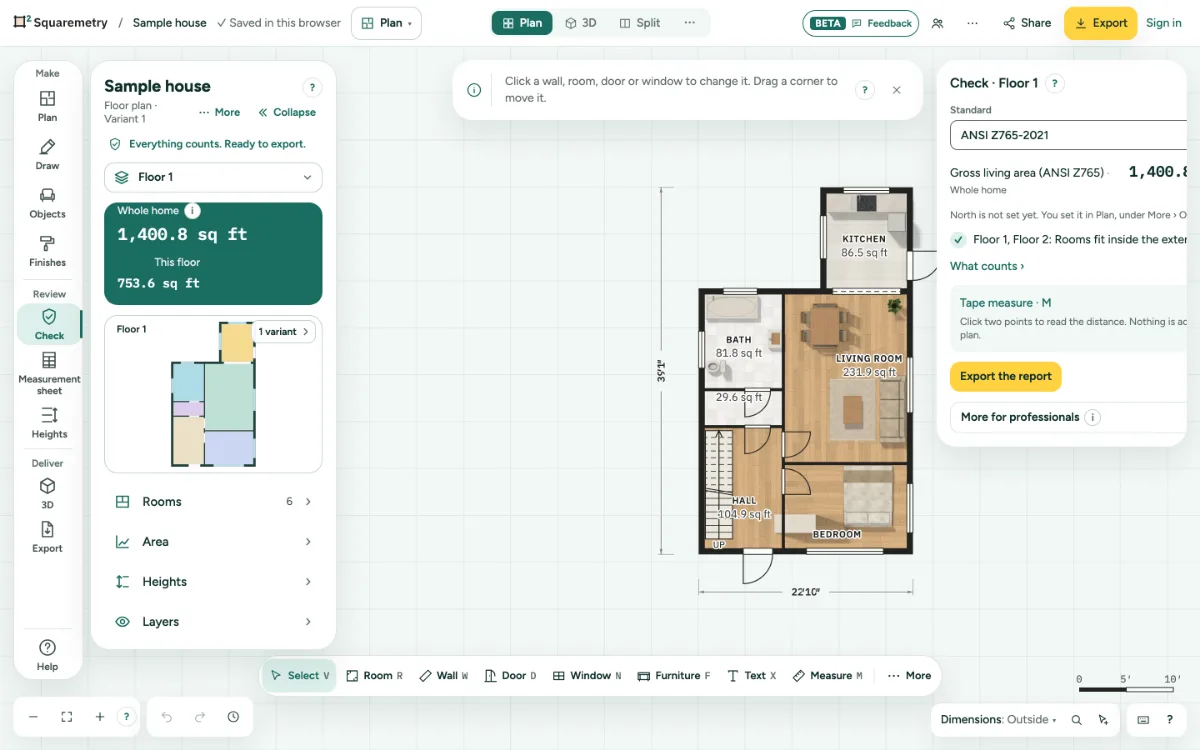
Review: check, measurement sheet and the standard: step by step
1. Open Review
In the rail next to the panel, click Check, Measurement sheet or Heights, under Review. On a phone they are in the row of words at the top of the Rooms sheet. Search with ⌘K finds them too, also by the old name Survey.
2. Three sections, one list
Check shows the standard, the main number and what is fine on the right; the points to check are in one list at the top of the panel on the left. Measurement sheet shows the sheet of the Dutch measuring instruction on the right. Heights opens the heights of the floors, with the build-up under More. What counts is under Plan › Area and what counts. Measuring is a tool: M in the bar.
3. Measure
In Check the tape measure is ready. Click two points to read a distance; nothing is added to the plan. The toolbar has Select, Line, Measure and Trace; Text, Callout and Freehand are under More.
4. Change the standard
Change the standard in Check. The numbers follow it, and Undo puts it back. Section and Elevations, with their heights, are in the top bar.
5. Back to drawing
Click a section of Make in the rail, such as Plan or Draw. You stay in Plan, and what you chose stays chosen.
Parts on the screen
Workspace menu. Shows where you are. Click it to switch between Plan, Model, Sheets and Present, or to change your work profile.
Shortcuts
- M
- Measure
- ⌘K
- Search tools, actions and help
On Windows and Linux, use Ctrl where the Mac has ⌘.
Messages you may see
- The standard is now the one you chose. The numbers follow it.
- Draw a room and the checks show here.