Skip to the content
FIRST HOME FREE 30 days of exports without the mark, no card
Modelling in 3D

Model: saved views, styles and sun

Guide: Model: saved views, styles and sun · · 1 min read

Save what you see and come back to it. Change the line style, look through walls, and see the shadow at any month and hour.
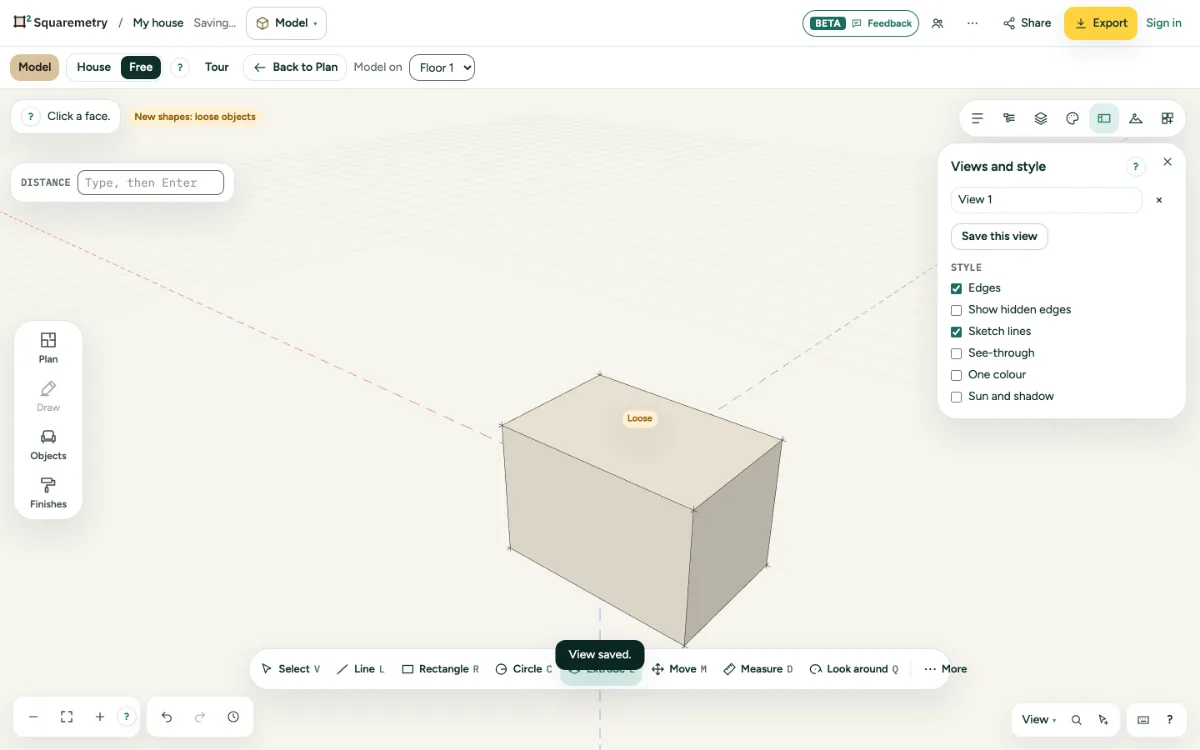
Views and style open with a saved view and the style switches.

Model: saved views, styles and sun: step by step

  1. 1. Save a view

    Open Views and style and click Save this view. A view keeps the camera, the style, hidden layers and the section.

  2. 2. Style

    Edges, Show hidden edges, Sketch lines, See-through and One colour change only how it looks.

  3. 3. Sun and shadow

    Turn on Sun and shadow and set the month and the hour. North comes from your plan.

Messages you may see

  • View saved.

Related

Still stuck?

Questions about “Model: saved views, styles and sun”? Send us a message and tell us what you tried. We will help you from there.

Start with your first floor plan

Your first home is free for 30 days, no card needed. After that: $5 per home, or Pro from $24 a month.

Start for free

or sign in with a code by email