Skip to the content
FIRST HOME FREE 30 days of exports without the mark, no card
Modelling in 3D

Model: furniture from the library

Guide: Model: furniture from the library · · 1 min read

Put furniture from the Squaremetry catalogue in your model as a component, at its catalogue size.
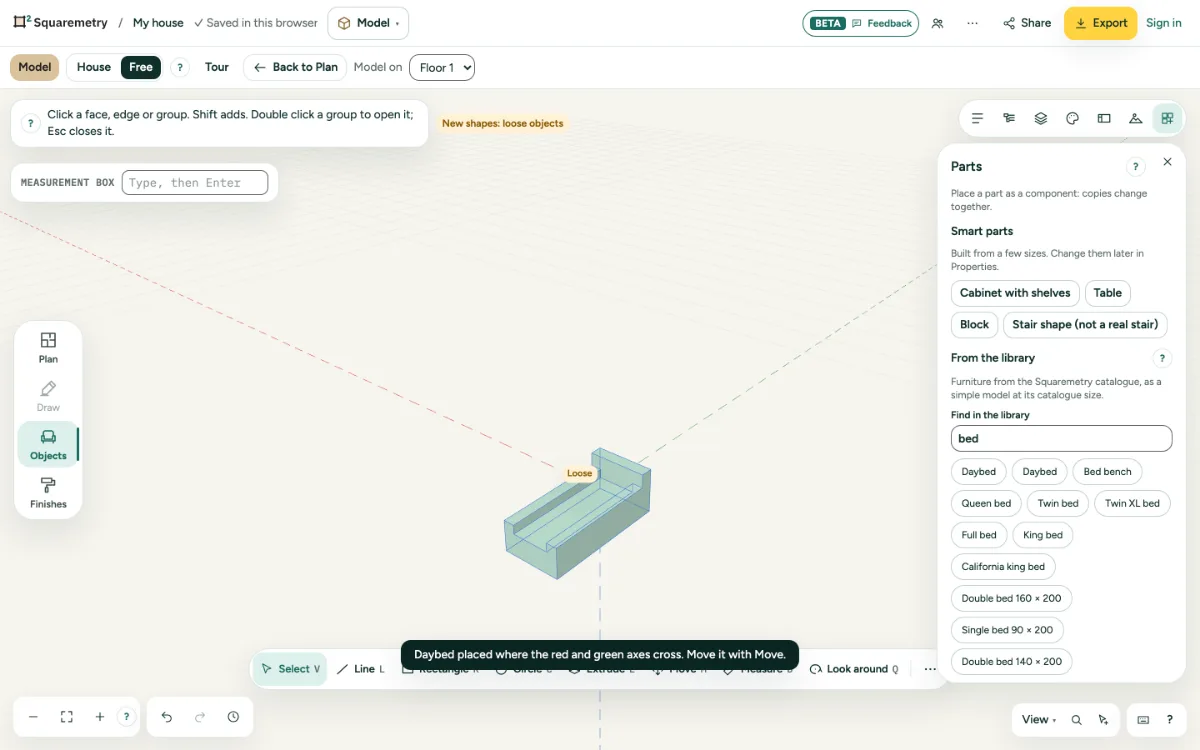
Parts open with results for bed, and a bed placed.

Model: furniture from the library: step by step

  1. 1. Find it

    Open Parts and type at least two letters in Find in the library, for example bed or table.

  2. 2. Place it

    Click a result. It comes as a simple model in our colours, where the red and green axes cross.

  3. 3. Again

    Placing the same piece again gives a copy of the same component.

Messages you may see

  • Nothing found. Try another word.

Related

Still stuck?

Questions about “Model: furniture from the library”? Send us a message and tell us what you tried. We will help you from there.

Start with your first floor plan

Your first home is free for 30 days, no card needed. After that: $5 per home, or Pro from $24 a month.

Start for free

or sign in with a code by email